Upload issues can be due to a number of different factors, but if
you follow these steps you should be able start uploading vids again
in no time!
Vid Errors
Sometimes a vid won't upload because of an issue with the file format/dimensions,
or can't be launched because of an issue with the
vid details.
When this happens, you will see an error message including info to
resolve the problem.
Is your file too large? Is the file type supported on MV?
On MV we support the following file types:
If your vid file isn't one of these types, you will need to convert
it using a video editing program or online file converter. As for
file size/length, it must be under 10GB in size and over 1:00 (1
minute) in length.
If your file is the right type, length, and size, and you need
help resolving the error message, don't hesitate to contact
help@manyvids.com and we'll
be happy to help!
Sometimes an error can be caused by something other than the file
itself! If you aren't seeing any error messages,
try the steps below to resolve the problem.
What browser are you using?
Google Chrome is the preferred browser for use with MV as our site
is optimized from Chrome. If you haven't tried your upload using
Chrome, this may solve the issue. If you already attempted your upload
on Chrome, try again using an Incognito Window (click the 3-dots
in the top right of the browser and hit 'New Incognito Window') as
this will rule out cached memory and extensions which could be causing
the issue.
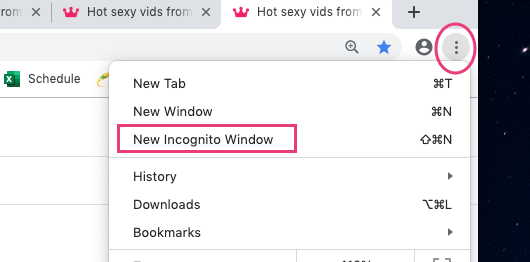 Try your upload in Incognito Mode! This often solves the problem.
Could another program or browser extension be causing an interruption?
Browser extension and other programs could cause interruptions when
uploading your vid. Make sure you don't have the vid file open in
another program at the same time you are attempting to upload it,
and try disabling any browser extensions as this may fix your issue.
Is your internet connection causing the issue?
Other programs or websites could be using your upload bandwidth which
may cause interference and/or failed uploads. Try closing any other
programs you have open that could be using the internet as well as
any other sites (this goes for any device using the same internet
connection). If you are attempting your upload over Wifi on a mobile
device, you can switch to data and try your upload that way.
A great way to check if your connection is strong enough is to run
a speed test (http://www.speedtest.net/).
Choose any Ashburn, VA server-- as these are our baseline for troubleshooting.
Connection stability can also cause problems.
Did these steps solve the issue?
If you tried everything suggested above and you are still unable
to upload, please send a screenshot of the error you are getting
(making sure you are in incognito mode, showing the entire browser
window in your screenshot) along with the speed test results to
help@manyvids.com so we can
further analyze and get you uploading again!